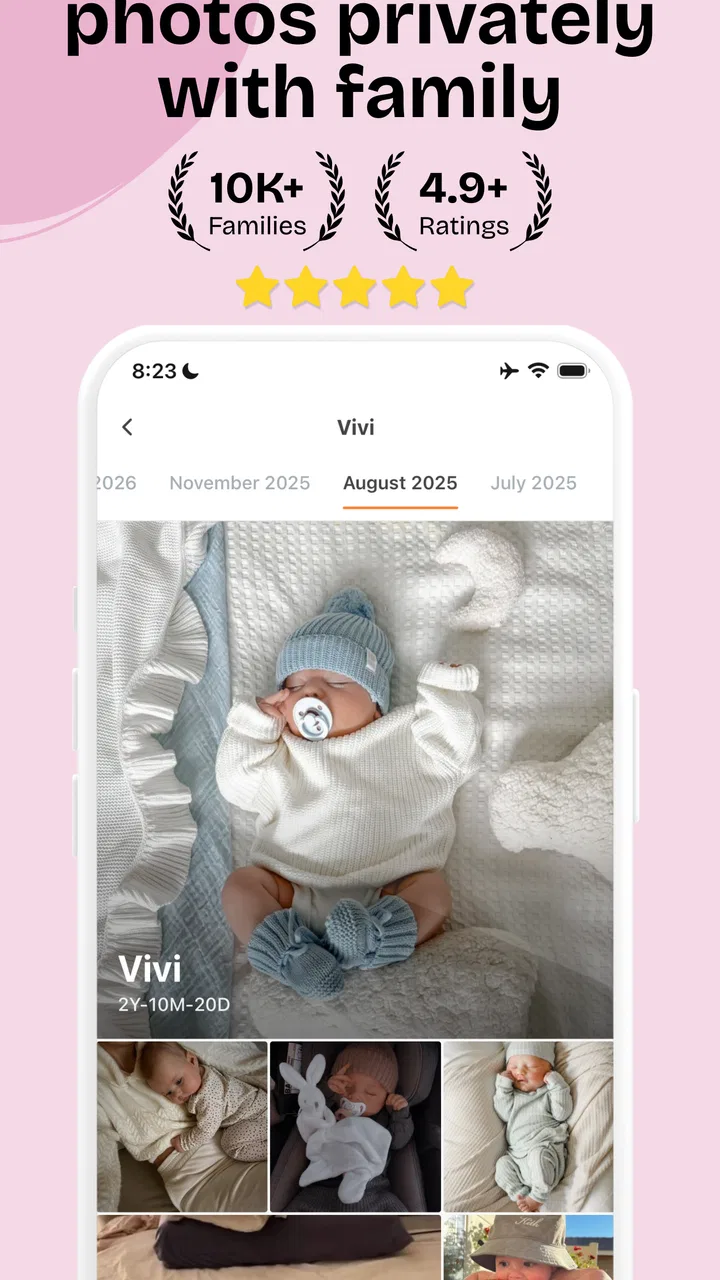
TinyNest - Family Album
- 4.7
- Rating
- 10.00K
- Installs
- Free
- Price

 Analysis by App-foxy
I found TinyNest - Family Album appealing for a very specific reason: it treats baby photos as something meant to be shared within a family, rather than as ordinary social media posts. That distinction matters when the people who want every picture are grandparents, relatives, or close friends who do not need a public feed. I reviewed it as a parenting app from Tiny Nest AI LLC, and my overall impression is that its value depends less on flashy tools and more on whether your family wants one focused place for those everyday moments.
The app is free to start, which makes it easy to try without turning the first decision into a purchase. It also carries a 4.7 average from over 400 ratings, while its install count has passed 10,000. Those figures suggest that the idea is connecting with a real group of families, although I would still judge it by your sharing habits rather than by popularity alone. TinyNest is rated for teens, so parents should pay attention to how they invite relatives and manage the audience around children’s images.
How TinyNest feels when sharing family photos
I approach a family photo app with a different kind of caution than I would a casual social feed: the pictures may include a child’s face, routines, and private moments. In this section, I’m focusing on how TinyNest’s family-sharing purpose should shape the way I decide who belongs in an album. That naturally leads to the practical question of which choices I can verify and manage before sharing becomes a habit.
You May Also Like

 Blood Strike: 2.5 Anniversary
Blood Strike’s Loadouts Turn Every Drop Into a Tactical Gamble
A close look at Blood Strike’s custom loadouts: how fast access to signature weapons reshapes its battle royale rhythm, rewards preparation, and narrows the gap between fights.

 Pandora - Music & Podcasts
Pandora’s Music Is Easy to Start, but Harder to Recover
Pandora’s strength is its low-effort path from a seed to a station. Its weak spot is how much confidence it asks you to place in connection, setup, and quiet recovery.

 8 Ball Pool
 Is Built on Rivalries, Rematches, and Routine
A close look at the rivalries, rematches, shared routines, and unanswered safety questions that turn a quick pool match into a persistent mobile community.

 Samsung Music
’s Quiet Strength Is Playing What You Already Own
Its reach comes less from spectacle than from dependable access to a personal library. That simplicity is both the app’s strongest retention engine and its ceiling.

 AccuWeather: Weather Radar
AccuWeather Review: A Quick, Clear Forecast for Everyday Decisions
For everyday plans, the best forecast is the one you can understand quickly. AccuWeather makes rain timing, radar, and local conditions easy to act on, with a few trade-offs.

 Hill Climb Racing
Why Hill Climb Racing Still Turns Crashes Into One More Run
A tiny car, a bumpy hill and one more upgrade: Hill Climb Racing keeps resurfacing because its simple chaos makes every near-miss feel personal.
More From Our News Desk
View All News


A focused alternative to ordinary messaging
My first practical takeaway is that TinyNest makes more sense when the family has outgrown sending photos one conversation at a time. Messaging apps are convenient, but baby pictures quickly become scattered across individual chats, group threads, camera rolls, and cloud backups. A dedicated family album gives the collection a clearer purpose: relatives can look for new memories in one place instead of asking someone to resend the same image.
That focus is also the app’s main trade-off. If you only share an occasional photo with one person, a normal message may be quicker. TinyNest becomes more useful when several people want access repeatedly and when you want the photos to feel like a continuing family record. I would recommend it most to parents who regularly receive requests such as “send me the latest picture” or who want grandparents to follow along without joining a broader social network.
In everyday use, the best workflow is to decide who genuinely needs access before uploading a large batch. Start with the closest family circle, then add others only when there is a clear reason. That keeps the album easier to follow and reduces the chance that a private baby photo is shared more widely than intended. The strongest benefit is controlled family sharing, not simply another place to store pictures.
A realistic morning-to-evening use case
Imagine a parent taking a few photos during breakfast, a first walk, and bath time. Instead of sending each picture to separate relatives, the parent can treat the album as the day’s shared update. A grandparent who checks later sees the same family story without interrupting the parent for multiple messages. That is a small change, but it removes repetitive work during an already busy day.
The same approach works for relatives who live in different time zones. They do not need everyone to be online at the same moment, and the parent does not need to coordinate a group conversation around every new image. For families who want a quieter way to stay connected, this is more comfortable than posting publicly or maintaining several overlapping chats.
I also see a useful role for the app during short family events. If several relatives are taking pictures at a birthday or a first visit, a shared album can become the natural destination for the memories. The important habit is to agree on one place before the event begins. Otherwise, people may continue using their usual messaging apps and the album will not solve the fragmentation it is designed to address.
What happens when the album becomes busy
The experience is likely to feel simplest when the album contains a manageable stream of photos. Heavy use changes the challenge. A busy family may upload many similar images, and relatives may open the app expecting to find one important update among a long sequence. In that situation, the problem is not only technical performance; it is also attention. A focused album can become noisy if nobody develops a simple posting routine.
My advice is to avoid uploading every near-duplicate. Keep the clearest image, add the meaningful moment, and leave out the accidental shots. This makes browsing easier and reduces unnecessary storage and network activity on the devices involved. It also helps relatives who check in less often, because they can understand what happened without scrolling through a large burst of almost identical photos.
For a family with several children, separate organization habits become especially important. Even without assuming a particular sorting feature, I would use consistent captions or a predictable posting rhythm if the app supports those choices in your setup. A short note such as “park visit” or “first swim” can be more useful later than a long stream of unlabeled images. This is one of the less obvious ways to get more value from a family album: make it readable for people who were not present.
Speed expectations and the cost of convenience
I would set realistic expectations about speed. Photo sharing is naturally more demanding than sending a short text because images must be selected, prepared, transferred, and displayed. The app may feel immediate with a small upload and a strong connection, while a larger batch can take longer and may depend heavily on the phone and network being used.
That makes selective uploading worthwhile. If you are standing outside with a weak connection, choose the essential photo instead of trying to send an entire day’s gallery. You can add more later when the connection is stable. This is a practical way to avoid mistaking a slow transfer for an unreliable app.
I would also avoid judging the experience from the first seconds after opening an album that contains a lot of recent images. Image-heavy screens can take more work than a text-based chat, especially on an older phone. Giving the app a moment to load is reasonable; repeatedly tapping upload or navigating away while a transfer is in progress is more likely to create confusion. A calm, one-batch-at-a-time workflow should feel more dependable than hurriedly submitting several batches.
Stability during repeated family use
For a parenting app, reliability matters because the best photo-sharing system is the one relatives can use without constant explanations. TinyNest is currently listed as version 1.266.0, which indicates an actively maintained product rather than an abandoned experiment. Still, a version number alone cannot guarantee that every device or connection will behave identically, so I would introduce it gradually to family members instead of moving every important photo workflow on the first day.
A sensible test is to invite one or two relatives, upload a small set of pictures, and then check the experience from each person’s phone. This reveals practical friction early: whether someone can find the album easily, whether uploads complete as expected, and whether the viewing process feels clear to a less technical family member. Testing with the actual people who will use it is more informative than assuming that a simple concept will be equally simple for everyone.
Recovery habits are important too. I would keep original photos in the phone’s normal photo library or another storage method you already trust until you are comfortable with the app. That is not a criticism of TinyNest; it is good practice whenever a new service becomes part of a family’s memory routine. A shared album should make access easier, but I would not make it the only copy of irreplaceable pictures.
Device limits and the Android requirement
The Android version requires at least Android 7.0, so compatibility is reasonably broad for phones that still run that system. Even so, minimum compatibility does not mean identical performance on every supported device. Older hardware may handle large photo batches less comfortably than a newer phone, and limited free space can make any photo-focused workflow more frustrating.
If you are using an older device, I would begin with a few photos rather than a full camera-roll selection. Keep the phone charged, close unrelated heavy apps, and give transfers time to finish. These are ordinary precautions, but they matter more with a family album because several people may be uploading and viewing around the same occasion. The app’s usefulness should not be judged solely by how a very old phone handles a large burst of images.
Parents should also consider the devices used by relatives. A technically confident parent may find the setup straightforward while a grandparent with an older phone needs more guidance. I would prepare a short explanation: where to look for new photos, how often to check, and whom to contact if something seems missing. That small onboarding step can prevent the family from abandoning the app after one confusing moment.
Privacy-minded sharing without overpromising
Because the subject is baby photography, I would be more careful here than I would with a casual photo app. The app’s purpose is family sharing, but that does not remove the need to think about audience boundaries. Only invite people you trust, review the membership occasionally, and avoid treating a private album as permission to repost images elsewhere.
The teen content rating is another reason to involve parents actively in how the service is used. It is not a substitute for family rules. Decide whether relatives may download, forward, or publish pictures, and make that expectation clear before the album fills with personal moments. A few minutes of agreement can prevent awkward conversations later.
I would also separate “sharing with family” from “archiving forever.” Those are related but different jobs. TinyNest is attractive as a living stream for relatives, while a long-term archive may still belong in your established photo backup system. Keeping those roles distinct makes recovery easier and avoids expecting one app to handle every part of a family’s digital memory.
Free entry and the point where costs matter
TinyNest is free to download and use at the entry level, which lowers the barrier for a family that wants to experiment. The app also includes in-app purchases ranging from about thirteen dollars to around eighty dollars per item. That range is wide enough that I would inspect the purchase screen carefully before committing, especially if several relatives will depend on the service.
My recommendation is to test the free experience with a real but nonessential album first. Ask whether the people you invited actually open it, whether the posting routine feels natural, and whether it solves a problem that messaging was creating. If relatives rarely check, paying for expanded access may not improve the situation. If the album becomes a genuinely useful family habit, then a purchase can be considered on the basis of that demonstrated value rather than anticipation.
This is also where TinyNest differs from free messaging apps. Messaging may cost nothing extra and may already be familiar to everyone, but it spreads photos across conversations and makes long-term browsing awkward. TinyNest asks you to adopt a separate destination, and the possible purchase costs become part of that decision. For some families, organization is worth it; for others, the extra app will feel like unnecessary duplication.
Who will appreciate it most
I think the app is a good fit for new parents who want grandparents and close relatives to follow a child’s everyday life without using public social media. It is also suitable for families separated by distance, especially when people want to browse updates on their own schedule. The focused purpose can make sharing feel more intentional and less exposed than posting to a broad audience.
It may also help a parent who is tired of being the family’s photo dispatcher. If the same image is repeatedly requested by several people, one shared album can reduce that administrative burden. The benefit is not dramatic automation; it is the removal of small repeated tasks that become irritating over weeks and months.
I would be less enthusiastic for someone who wants sophisticated editing, a professional-grade archive, or a public audience. TinyNest is not the obvious choice for showcasing photography, managing a large media library, or replacing every backup tool. A standard cloud photo service may be better for searchable storage, while a messaging app may remain better for one-off conversations and quick reactions.
Where the experience can become frustrating
The first friction is adoption. Every relative must be willing to use another app, and the parent may end up answering setup questions. If the family already has a comfortable group chat, persuading everyone to change habits may take more effort than the album saves.
The second is volume. A family album can become cluttered if everyone uploads freely without any shared etiquette. That is why I would establish simple rules early: avoid duplicates, keep sensitive images within the intended circle, and use the album for meaningful updates rather than every camera test. These rules are not built into the concept; they are part of making the concept work.
The third is dependence on connectivity and device condition. A photo service cannot feel instant when the network is poor, the phone is nearly full, or several large uploads are competing for attention. If your household often operates with limited connectivity, a local photo-sharing method or delayed upload routine may be more practical.
My performance verdict after weighing the trade-offs
My verdict is positive, with a clear condition: TinyNest works best when the family treats it as a focused viewing space rather than a universal photo-management system. Its perceived speed should be comfortable for small, deliberate updates, while heavy batches deserve patience and a little organization. The Android requirement of 7.0 keeps it accessible to many devices, but older hardware and crowded photo libraries can still shape the experience.
I also value the recovery-minded approach of keeping originals elsewhere until the family has tested the routine. That makes adoption safer and removes pressure from the first few days. If an upload takes longer than expected or a relative needs help, you still have the original photos and can resolve the issue without losing the memory.
For parents who want a private-feeling family stream and are willing to bring relatives into a new habit, I would recommend giving TinyNest - Family Album a careful trial. Start small, invite only the intended people, upload a few meaningful photos, and observe how the group actually uses it. For families that need advanced archiving, public sharing, or instant one-to-one messaging, a different tool may remain the better choice. But for its narrower purpose, this parenting app offers a sensible way to turn scattered baby updates into a shared family routine.
FAQs for TinyNest - Family Album
01What is TinyNest - Family Album used for?
TinyNest - Family Album is designed to help families collect, organize, and share personal photos and memories in one private space. Instead of relying only on a general social network, family members can use the app to create a more focused album for children, relatives, holidays, milestones, and everyday moments. It is especially useful for keeping loved ones connected when they live in different places.
02Is TinyNest - Family Album private and safe for sharing family photos?
Privacy is one of the main reasons families may choose TinyNest over a public social platform. The app is intended for sharing memories with invited relatives and selected contacts rather than broadcasting them publicly. However, users should still review the app’s privacy policy, account permissions, sharing controls, and cloud-storage practices before uploading sensitive images, particularly photos of children or other personal family information.
03Can several family members upload and view photos in the same album?
The app is built around shared family memories, so it is generally suitable for collaborative albums where more than one approved member can contribute and view content. This can make it convenient for parents, grandparents, and other relatives to add photos from their own devices. Before downloading, check the current membership limits and whether different roles or permissions are available for album administrators and invited viewers.
04Does TinyNest - Family Album work on both Android and iPhone?
TinyNest - Family Album may be available for mobile devices through the relevant Android or iOS app store, but availability and supported versions can change over time. Before installing, confirm that the listing matches your device, operating-system version, and region. It is also worth checking whether family members on Android and iPhone can participate in the same album without losing access to important sharing or viewing features.
05Is TinyNest - Family Album free to download, and are there in-app purchases?
The download price and available features can depend on the platform, region, and version of the app. Some family album services offer a free basic experience while reserving extra storage, larger albums, premium customization, or advanced sharing tools for a subscription or one-time purchase. Review the store listing carefully before signing up, including trial terms, renewal conditions, and whether deleting the app cancels any active subscription.
Pros
- Private space for sharing family photos and memories
- Simple interface suitable for relatives of all ages
- Keeps family moments organized in one dedicated album
- Useful for sharing updates with distant family members
- Helps reduce clutter from large group chats
Cons
- Some features may require a subscription or in-app purchases
- Requires relatives to install the app and create accounts
- Limited value if your family prefers existing social platforms
- Cloud storage and backup details may need closer review
- Privacy depends on account security and invite management

TinyNest - Family Album
Gallery